
Owner's Manual
SkyHawk 4K Drone manual and troubleshooting guide
Everything you need for a safe first flight, plus fixes for the problems owners contact us about most.
Free US shipping 90-day guarantee
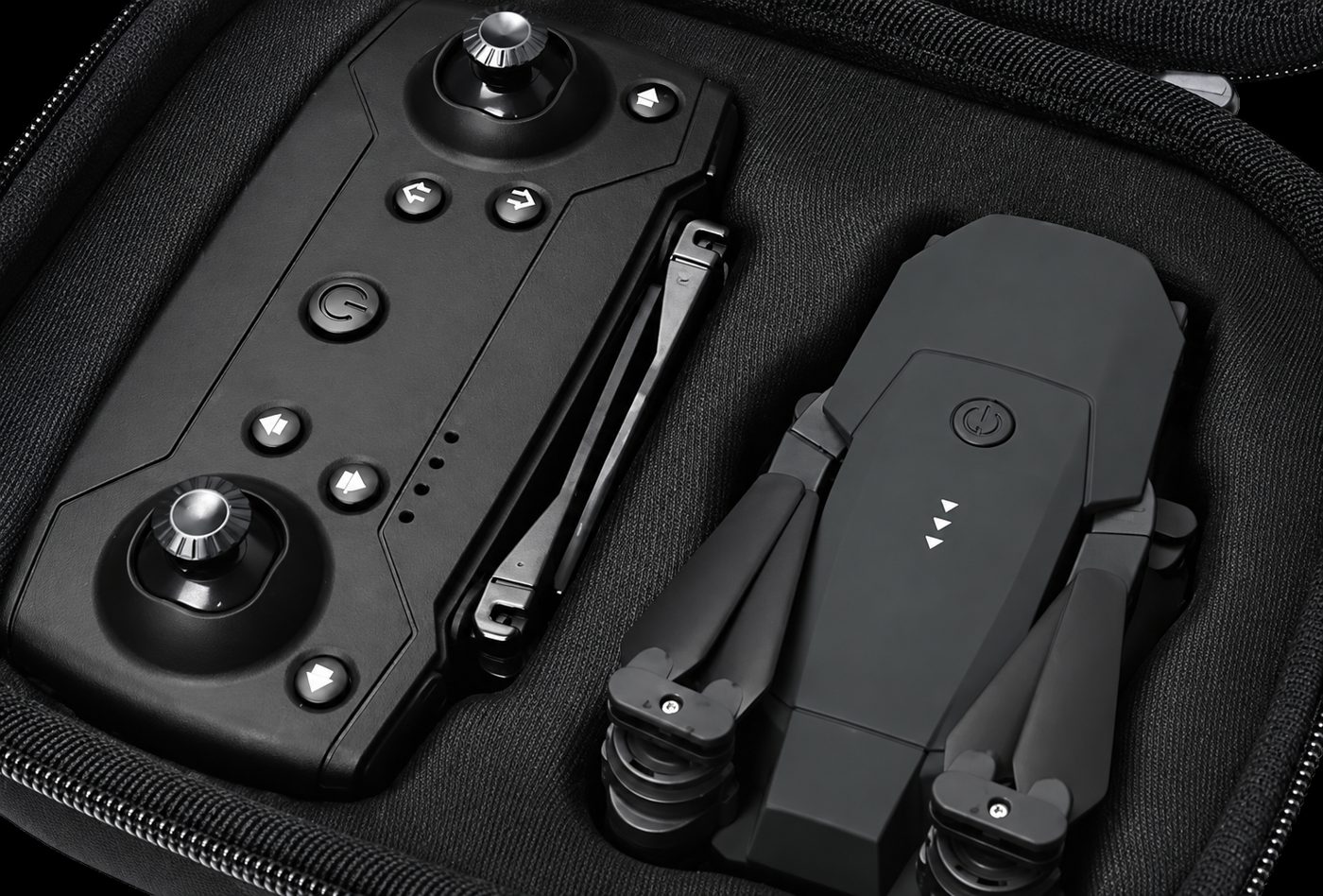
What's in the box
- SkyHawk 4K Drone with folding arms
- Radio controller
- Removable rechargeable flight battery
- USB charging cable
- Spare propellers
- Hard-shell carry case
First-flight setup
- Charge the flight battery over USB until the indicator shows full (about 90 minutes).
- Unfold all four arms until they click into place and remove any propeller guards.
- Insert the battery, power on the drone, then power on the controller.
- Move the throttle fully up and then fully down to pair; the lights go solid.
- In your phone's Wi-Fi settings, join the drone's network, then open the app for live view.
- Place the drone on flat, open ground at least 20 feet from people and obstacles.
- Press one-key takeoff. The drone lifts and holds altitude on its own.
Control layout
- Left stick — altitude up/down and rotation left/right.
- Right stick — forward, back and sideways movement.
- Takeoff / land button — one press to launch, one press to land.
- Return-home button — flies the drone back to its launch point.
- Speed button — cycles between beginner and faster flight rates.
- Photo / video buttons — capture stills or start and stop recording.
Calibration
Place the drone on level ground, power on both units, and hold both sticks to the bottom-left corner until the lights flash and go solid. Do this before your first flight of the day and any time the drone drifts.
Care and safety
- Fly within FAA recreational rules and keep the drone within visual line of sight.
- Never fly near airports, crowds, or in restricted airspace.
- Let the battery cool before recharging, and store it partially charged.
- Check propellers for chips before each flight and swap in spares as needed.
Troubleshooting
The drone drifts or won't hold level
Land, place the drone on flat ground and recalibrate the gyroscope by holding both sticks to the bottom-left until the lights stop flashing. Fly again in a spot away from strong wind.
The controller won't pair
Power on the drone first, then the controller. Move the throttle stick fully up then fully down; the lights should go solid when the link is made. Fresh controller batteries fix most pairing failures.
The app shows no live video
Connect your phone to the drone's Wi-Fi network in your phone settings before opening the app. Keep the drone within about 30 feet on the first connection.
Flight time seems short
Cold weather, wind and aggressive stick input all shorten flight time. Charge fully for roughly 90 minutes and let the battery cool before recharging after a flight.
One propeller isn't spinning
Power down, check for hair or grass wound around the motor shaft, and confirm the propeller is fully clicked on. Swap in a spare propeller from the case if one is bent.
Still stuck?
Email support@skyhawk4k.com or call 1-888-860-5378 (Mon-Fri, 9am-6pm ET) and we'll work through it with you. If the drone is faulty, the warranty covers a replacement.
Your first five flights, in order
- Flight 1 — hover only. Take off, hold at head height for a minute, land. Learn what the drone does with no input.
- Flight 2 — squares. Fly a slow square at low altitude with the nose always pointed away from you.
- Flight 3 — orientation. Turn the drone to face you and practise the reversed controls. Switch on headless mode if it gets confusing.
- Flight 4 — height and framing. Climb, hold altitude and record a short level clip. One movement per clip.
- Flight 5 — recovery. Fly out a comfortable distance and use one-key return so the button is muscle memory before you ever need it.
Pre-flight checklist
- Battery fully charged and clicked firmly into place.
- All four arms unfolded until they click, propellers undamaged and tight.
- Open space, no power lines, roads, crowds or airport nearby.
- Light wind only. Gusts overpower any drone this light.
- Drone on level ground, compass calibrated if prompted, app connected.
- You know your local rules and can keep the drone in sight.
Troubleshooting the common ones
- Drifts in the hover: land, place on level ground and recalibrate. Drift is almost always a calibration issue, not a fault.
- App will not connect: confirm the drone is powered on, join its Wi-Fi in your phone settings, then reopen the app. Turn mobile data off briefly if your phone keeps dropping the network.
- Video looks shaky: slow your stick inputs, let the drone settle before recording, and avoid windy conditions.
- Short flight time: check for cold weather, wind or an ageing pack, all of which reduce it.
- Controller not binding: power the drone first, then the controller, and keep them within a metre of each other during binding.
Care that extends its life
Wipe the gimbal and lens with a dry microfibre cloth only. Never spray liquid on the camera. Replace propellers at the first sign of a chip or bend — a damaged blade throws off the balance and stresses the motors. Store the drone folded in its case with the battery removed.
SkyHawk 4K Drone specifications
- Camera
- 4K HD, 120° wide-angle lens
- Video
- Up to 60 frames per second
- Stabilization
- 3-axis gimbal stabilizer
- Top speed
- Up to 30 mph
- Flight modes
- Altitude hold, headless mode, 360° flips, one-key return
- Control
- Radio controller + smartphone app with live view
- Design
- Foldable arms, hard-shell carry case
- Battery
- Removable rechargeable lithium battery
- In the box
- Drone, controller, battery, USB charging cable, spare propellers, carry case
- Ships to
- All 50 US states
Free US shipping
Ships from our US warehouse
90-day guarantee
Money back if it's not for you
Encrypted checkout
Card details never touch our servers
US support team
Mon-Fri, 9am-6pm ET
Ready to fly your SkyHawk 4K?
Bundle pricing from $59 per drone, shipped free anywhere in the US.
Order Now & Save Up To 60%Free US shipping 90-day money-back Secure checkout
Manual and setup questions
How do I pair the drone with my phone?
Power on the drone, open your phone's Wi-Fi settings and join the drone's network, then open the companion app. The live view appears once the connection is established.
How do I calibrate the drone?
Place it on level ground away from metal and follow the app's calibration prompt. Recalibrate whenever the drone drifts in a hover or after a hard landing.
What do I do if it drifts while hovering?
Land, set it on a flat level surface and recalibrate. Drift is nearly always a calibration issue rather than a defect.
How do I change the propellers?
Match each spare to the marking on the arm it replaces, remove the damaged blade and fit the new one until it seats. Replace any propeller that is chipped or bent rather than flying it.
Is there a printed manual in the box?
A quick-start guide is included with the drone, and this page covers setup, controls, calibration and troubleshooting in more detail.
Who do I contact if I am still stuck?
Email support@skyhawk4k.com or call 1-888-860-5378, Monday to Friday, 9am to 6pm ET, with your order number to hand.